An AI assistant that reads the page with you.
Most AI tools live in another tab. Klime sits in your browser side panel, next to the article, documentation or email you are working on, and answers with that page as context.
Free: 1 AI request per dayNo browsing history kept
The problem
Copying text into a separate chatbot breaks your focus and loses the context of what you were reading.
How Klime helps
Klime opens beside the page. Ask a question, pick a quick action, or highlight a passage and ask about just that part.
The outcome
Answers that refer to what is actually on the page, while the page stays in view.
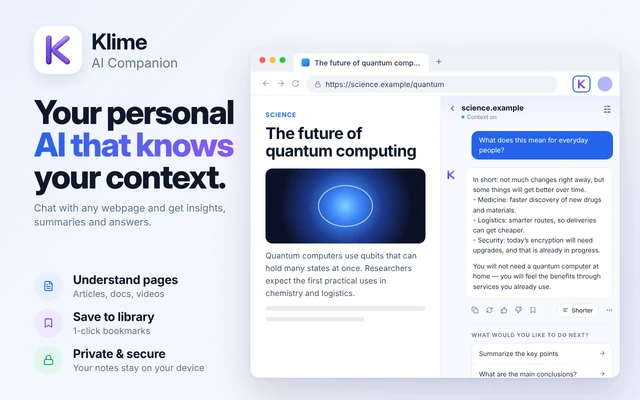
What a browsing session with Klime looks like
Works in the Klime side panel. Open it from the toolbar or with ⌘ + M.
Open Klime beside the page
Click the Klime icon in the toolbar or use the keyboard shortcut. The side panel opens without covering the page.
Ask, or tap a quick action
Type a question such as "What does the author recommend?" or choose Summarize, Explain, Rewrite or Extract.
Ask about a selection
Highlight text, right-click and choose Ask AI to ask about just that passage.
Keep what matters
Save the page or a note locally, or copy the answer into your doc.
Klime answers from the page content it can read plus what you type. When you start a task, Klime Agent can click, type and open pages for you: you see every step, it asks before submitting, sending or buying, and it never types passwords or card details. Klime does not run on browser-internal pages.
Where a browser assistant earns its place
Research and reading
Find the section that answers your question, check a definition, or get the argument of a long essay in a few lines.
Documentation and how-tos
Ask how a setting, API or step described on the page applies to your situation.
Shopping and comparisons
Pull out the specs, terms or limitations a product page mentions, in a list you can scan.
Writing on the web
Rewrite a paragraph you are drafting, or reply to a message in your own tone.
Common questions
Is Klime an AI browser or an extension?
Klime is an extension. You keep using the browser you already have; Klime adds an AI side panel to it.
Does Klime see every page I visit?
No. Klime reads page context only while its panel is open or when you use Ask AI, sends it for processing only when you ask, and does not keep a browsing history.
Which AI model does Klime use?
Requests go through the Klime proxy to OpenRouter, typically using OpenAI GPT-4o mini or a successor model we configure.
Keep exploring Klime
Try it on the next page you open.
Install Klime and use your free daily request to see how it fits your work.