Get the point of a YouTube video without watching all of it.
Klime fetches a video's transcript and gives you a summary, the moments worth jumping to, and answers to your questions about what was said.
Free: 1 AI request per dayNo browsing history kept
The problem
Hour-long lectures, podcasts and tutorials hide the two minutes you actually need.
How Klime helps
Open Klime on the video page and ask it to summarize. Klime works from the available transcript.
The outcome
A clear outline of the video and a quick way to find the part that answers your question.
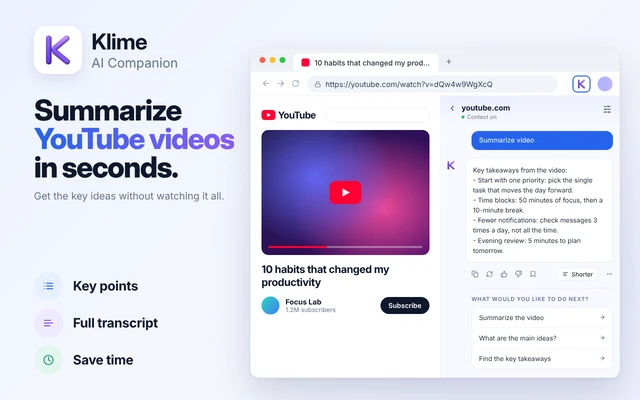
How to summarize a YouTube video with Klime
Works in the Klime side panel. Open it from the toolbar or with ⌘ + M.
Open the video on YouTube
Klime needs a transcript. Many videos have auto-generated or creator-provided captions.
Ask Klime to summarize
Open the side panel and choose Summarize video, or ask for key moments or a step-by-step list.
Ask about the content
Try "What tools does he recommend?" or "Where does she explain the setup?" and jump to that point.
Klime summarizes what is said, using the transcript. If a video has no transcript, Klime cannot summarize it, and it does not analyze the images in a video or upload the video file. A summary uses one AI request.
Videos that summarize well
Lectures and courses
Turn a long lecture into a revision outline and a list of terms to look up.
Tutorials
Extract the steps, settings and commands without scrubbing back and forth.
Talks and interviews
Get the main arguments and notable quotes before deciding to watch.
Product reviews
Pull out the pros, cons and verdict of a long review in a short list.
Common questions
Does it work on videos in other languages?
If a transcript is available, you can ask Klime to summarize it in your language. Accuracy depends on the transcript quality.
Does it work on live streams?
It depends on whether a transcript is available. Live streams usually have no full transcript until after they end.
Does Klime download the video?
No. Klime sends the video id and caption-track addresses to fetch the transcript text, never the video file.
Keep exploring Klime
Try it on the next page you open.
Install Klime and use your free daily request to see how it fits your work.